
Choosing the right payroll software is one of the most practical decisions an Indian small business can make. Every month you have to calculate salaries, track attendance and leave, deduct PF, ESI, professional tax and TDS, share payslips and transfer salaries on time. Doing all of this in spreadsheets works when you have five employees. At twenty or fifty, small mistakes start costing money, time and employee trust.
In this guide, we explain what payroll software does, which statutory deductions it must handle in India, the 9 essential features to look for, and how to choose a solution that grows with your business.
What Is Payroll Software?
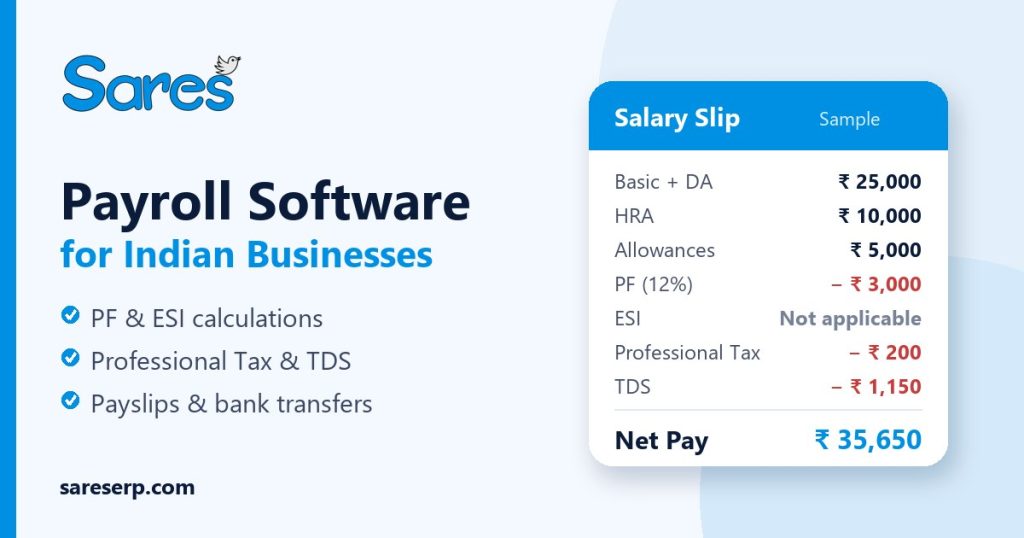
Payroll software is a system that automates how a business calculates and pays employee salaries. It takes inputs such as salary structure, attendance, leave, overtime and reimbursements, applies statutory deductions, and produces net pay, payslips, bank transfer details and compliance reports.
Good payroll software replaces manual calculations with rules you set once. When an employee joins, gets a raise, takes unpaid leave or works overtime, the system adjusts their salary automatically, so every pay run is consistent.
Why Indian Small Businesses Need Payroll Software
Payroll in India is more than multiplying days by a daily rate. Salary components, state-specific professional tax, wage ceilings for PF and ESI, and income tax regimes all affect the final number. Here is why growing businesses move from spreadsheets to payroll software:
- Fewer errors: formulas break, rows get skipped and rates change. Automated rules remove most manual mistakes.
- Time saved: a payroll run that takes two days in Excel can take minutes once attendance and salary rules are connected.
- Compliance on time: deduction reports are ready before statutory due dates, which helps you avoid interest and penalties.
- Employee trust: accurate, on-time salaries and clear payslips reduce disputes and HR queries.
- Better records: salary history, revisions and settlements are stored in one place for audits and future reference.
Statutory Deductions Your Payroll Software Must Handle
These are the main payroll deductions most Indian businesses deal with. Rates and thresholds are revised from time to time, so always confirm current rules on the official portals linked below.
Provident Fund (PF)
The Employees’ Provident Fund generally applies to establishments with 20 or more employees. Both employee and employer typically contribute 12% of basic wages plus dearness allowance, and part of the employer share goes to the pension scheme. Contributions are filed monthly through the EPFO portal.
Employees’ State Insurance (ESI)
ESI covers employees earning up to a notified wage limit (currently ₹21,000 per month) in establishments with 10 or more employees in covered areas. The employee and employer contribute a small percentage of gross wages each month. Details are available on the ESIC website.
Professional Tax (PT)
Professional tax is levied by individual states, so slabs and rules depend on where your employees work. Some states do not levy it at all. Your payroll software should let you configure PT slabs by state.
TDS on Salary
Employers must deduct income tax at source from salaries based on each employee’s estimated annual income and chosen tax regime, and deposit it with the government. The Income Tax Department publishes the current rules and due dates.
| Deduction | Who it applies to | What payroll software should do |
|---|---|---|
| PF | Establishments with 20+ employees (generally) | Calculate employee and employer share, generate monthly PF reports |
| ESI | Employees up to the notified wage limit | Check eligibility, calculate contributions, generate ESI reports |
| Professional Tax | Depends on the state | Apply state-wise slabs automatically |
| TDS | Employees with taxable salary income | Calculate monthly TDS and produce TDS reports |
9 Essential Features to Look for in Payroll Software
1. Attendance and Leave Integration
Salary depends on days worked. Payroll software that connects with attendance, shifts, leave and holidays can calculate attendance-based salary, half-day deductions and loss of pay automatically. Biometric integration removes manual attendance entry altogether.
2. Flexible Salary Structures
Every business pays differently. Look for salary structure setup with basic pay, HRA, allowances and deductions, plus support for salary revisions, so increments apply from the correct month without manual changes.
3. Automatic PF, ESI, PT and TDS Calculations
This is the core of compliant payroll software. Deductions should be calculated from your configured rules every month, with reports ready for filing. This saves hours and reduces the risk of late or incorrect payments.
4. Overtime and Reimbursements
Overtime, travel and food expenses, and other reimbursements should flow into payroll after approval. Claim tracking with an approval workflow keeps everyone accountable and avoids missed payments.
5. Payslips and Employee Self-Service
Employees should be able to log in and view attendance, leave balance and salary slips without emailing HR. PDF payslips and payslip history make it easy to answer questions and provide proof of income.
6. Bulk Payroll and Bank Transfers
Processing salaries one by one does not scale. Bulk payroll with salary approval and bank transfer support lets you pay your entire team in a single, controlled run.
7. Reports and Salary Register
A salary register, payslip reports and PF, ESI and TDS reports give management and accountants a clear view of payroll costs. These reports also make audits far less stressful.
8. Full and Final Settlement
When an employee leaves, their final salary, leave encashment, pending reimbursements and deductions must be settled correctly. Built-in full and final settlement avoids errors at a sensitive moment.
9. Integration with HRMS and Accounting
Payroll works best when it shares data with your HR records and your books. Integrated payroll software avoids double entry: employee data comes from HRMS, and salary costs flow into accounting automatically.
Standalone Payroll Software vs Integrated ERP Payroll
Standalone payroll software focuses only on salaries. It can work well for very small teams, but you still need separate tools for HR, attendance, accounts and inventory, and data has to be moved between them.
An integrated system such as an ERP for small businesses connects payroll with HRMS, attendance, accounting, CRM and inventory. Employee data is entered once, salary costs reach your accounts automatically, and management sees the full picture in one dashboard.
| Factor | Standalone payroll software | Integrated ERP payroll |
|---|---|---|
| Data entry | Repeated across tools | Entered once, shared everywhere |
| Attendance link | Often needs imports | Built in |
| Accounting | Manual journal entries | Salary costs flow automatically |
| Best for | Very small teams | Growing businesses |
How to Choose the Right Payroll Software
- Does it support PF, ESI, professional tax and TDS for the states you operate in?
- Can it connect with your attendance system or biometric devices?
- Does it offer employee self-service for payslips and leave?
- Can you process bulk payroll and bank transfers with approvals?
- Are role-based access and data backups in place to protect salary data?
- Will it grow with you into HRMS, accounting and other modules?
- Is pricing clear, and can you try it before committing?
Common Payroll Mistakes to Avoid
- Using outdated PF, ESI or PT rates after a revision
- Ignoring unpaid leave and half-days when calculating salary
- Missing statutory due dates because reports are prepared manually
- Keeping salary data in shared spreadsheets without access control
- Delaying full and final settlements for employees who leave
How to Move Payroll from Spreadsheets in 5 Steps
- Collect employee data: names, joining dates, bank details, PAN, UAN and ESI numbers where applicable.
- Define salary structures: set up components such as basic pay, HRA, allowances and deductions for each role or grade.
- Configure statutory rules: enable PF, ESI, professional tax for each state, and TDS settings.
- Connect attendance: link biometric devices or attendance records so leave and half-days flow into salary.
- Run a parallel month: process one month in both the old method and the new system, compare results, then switch fully.
Running one parallel month is the safest way to build confidence. Once the numbers match, your team can rely on the new process and spend far less time on monthly salary work.
How Sares Payroll Software Helps
Sares is an all-in-one cloud ERP for Indian businesses with payroll built into its HRMS module. You can set up salary structures, revisions, allowances and overtime, calculate attendance-based salary with leave and half-day deductions, and handle PF, ESI, TDS and professional tax. Bulk payroll, salary approval, bank transfers, PDF payslips, a salary register and full and final settlement are included, along with biometric attendance and an employee self-service portal, depending on your plan.
Because payroll sits alongside CRM, inventory and accounting, your data stays connected. Explore all Sares features, compare plans and pricing, or contact our team for a demo.
Frequently Asked Questions About Payroll Software
Is payroll software suitable for small businesses?
Yes. Even a team of 10 to 20 employees benefits from automated salary calculations, statutory deductions and payslips. Many businesses start with payroll and add HRMS and accounting as they grow.
Can payroll software calculate PF and ESI automatically?
Good payroll software calculates PF and ESI from your configured rules each month and generates reports for filing. You should still review rates whenever the government revises them.
What is the difference between HRMS and payroll software?
HRMS manages employee records, attendance, leave and performance. Payroll software calculates and pays salaries. Integrated systems combine both so payroll uses accurate HR and attendance data.
Is cloud payroll software secure?
Reputable cloud payroll software uses role-based access, secure logins and regular backups. Always check how a vendor protects and backs up salary data before you choose.
Final Thoughts
The right payroll software saves hours every month, reduces compliance risk and gives employees accurate, on-time salaries. Look for strong statutory support, attendance integration, self-service and room to grow. If you want payroll connected with HR, accounts and the rest of your operations, an integrated ERP like Sares is worth a look.